Unified Robot Interface (URI)
URI runs one mc_rtc controller over a fleet of heterogeneous robots. It also standardises how a new robot is connected to that controller.
Context
mc_rtc is a real-time, QP-based control framework. Usually, running mc_rtc on
a robot means writing a dedicated interface binary for that robot. The
binary embeds mc_control::MCGlobalController, talks to the robot's SDK and
runs the control loop. Each new robot needs another such binary, and
controlling several robots from one controller is not supported out of the
box.
URI splits that monolithic interface into three parts:
uri manager, the robot manager: a single process on the control PC that runs mc_rtc for the whole fleet. It reads theRobots:section ofmc_rtc.yamland feeds every robot's state into mc_rtc. It then sends mc_rtc's commands back to each robot.uri interface: one generic process per robot. It runs either on the robot's own PC or on the control PC. It knows nothing about a particular robot: at startup it loads aRobotDriverplugin (a shared library) that wraps the robot's SDK.robot_comm: the communication layer between the two. It currently uses Zenoh for transport and FlatBuffers for serialization. Neither side depends on how bytes travel.
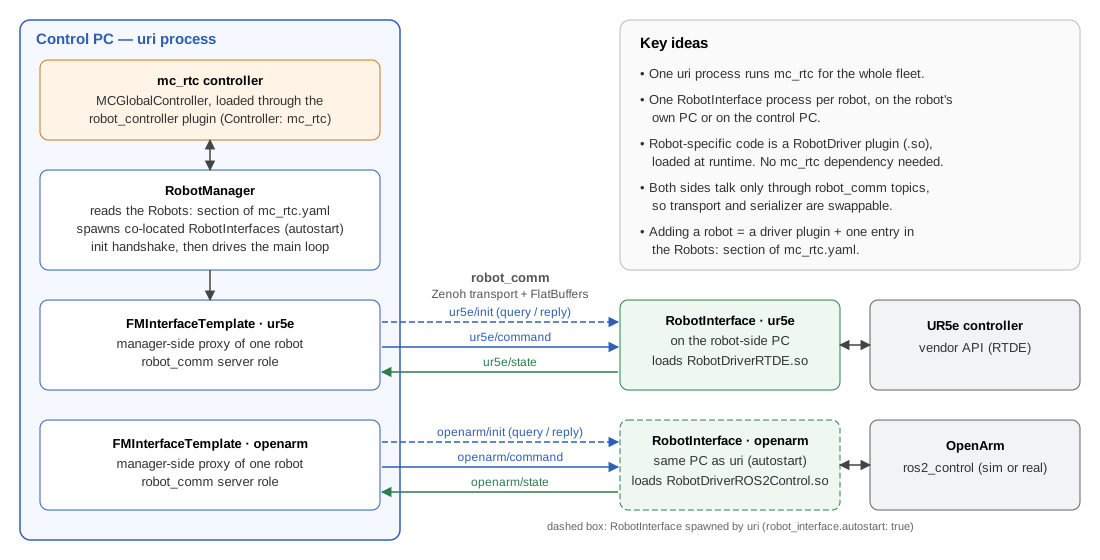
As a result:
- Adding a robot means writing a small
RobotDriverplugin (about eight methods, no mc_rtc dependency) and adding one entry tomc_rtc.yaml. See Create a new robot driver. - Robots can be distributed. A robot connected to another PC runs its own
uri interfacethere. A robot plugged into the control PC is started automatically byuri manager(robot_interface.autostart: true) and uses Zenoh shared memory. - Robots with different rates share one controller. Each robot keeps its own control period. mc_rtc runs at a multiple of it.
Components
| Directory | Library / binary | Role | Page |
|---|---|---|---|
robot_comm/ |
robot_comm |
Transport and serializer abstraction, message types, pub/sub and query/reply | Communication |
robot_manager/ |
uri, robot_manager, robot_interface |
Fleet orchestrator: config parsing, init handshake, main loop, manager-side robot proxies | Robot manager |
robot_interface/ |
RobotInterface (uri interface), robot_driver_api, robot_driver_loader, state viewer (uri viewer) |
Robot-side process, the RobotDriver plugin API and its loader |
Robot interface |
robot_controller/ |
robot_controller_mc_rtc |
Controller backend abstraction; mc_rtc is the only current backend | Robot manager |
Where to go next
- Getting started: build the project, run the examples and generate this documentation.
- Command line: the
uricommands and their options. - Communication: topics, messages, serializers and
how to use
robot_common its own. - Robot manager:
mc_rtc.yamlreference, the init handshake and the real-time loop. - Robot interface: the robot-side process, its control loop and how drivers are loaded.
- Supported robots: the existing driver plugins and how to install them.
- Create a new robot driver: scaffold, implement, build and test a driver for a new robot.
- Simulation: simulate robots with ros2_control, or write a simulation driver.
The API reference (classes, functions, namespaces) is in the sidebar. It is generated from the source code.



Copyright © CNRS-AIST JRL 2026